From the first roofline measurement to your app login, learn what a professional installation should include, which details depend on your Govee model, and what to check before signing off.
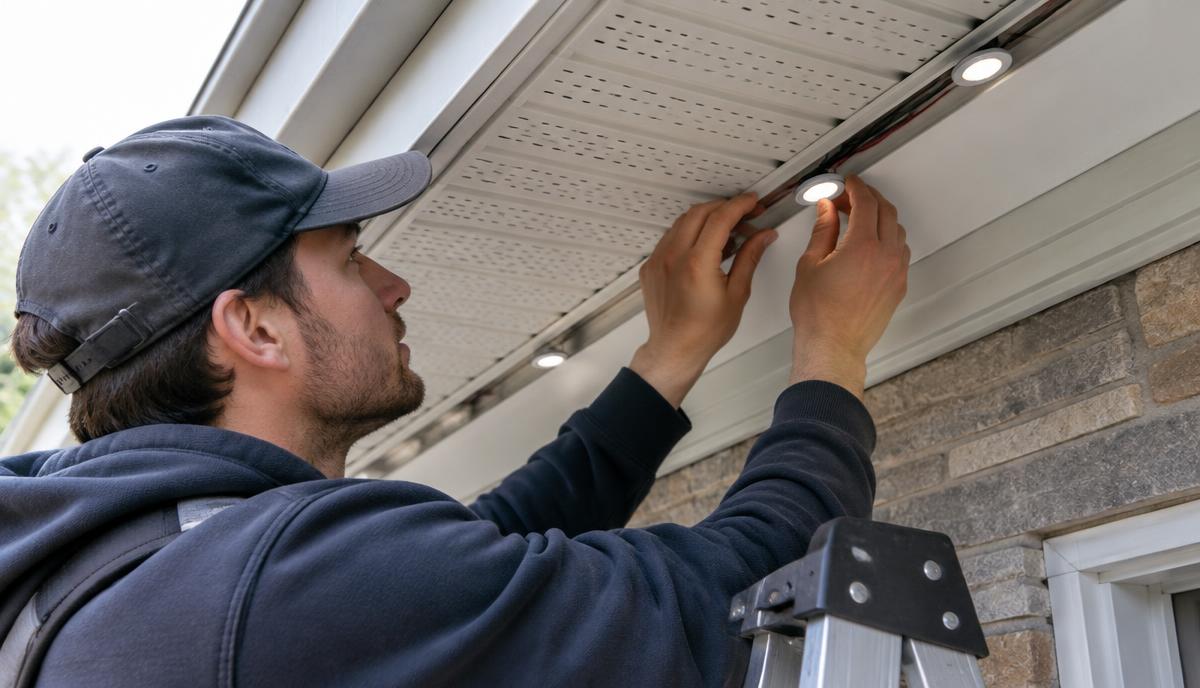
Before drilling the first hole, a Govee permanent outdoor lights installer should hold a short light section under your eave and check its distance from the wall. That position changes the light pattern. Moving it later can leave visible holes.
Here’s what a careful visit should cover, from measuring the roofline to leaving you with working scenes and clear service details.
What your Govee permanent outdoor lights installer measures
The walkthrough starts with the roofline, not the box of lights. Your installer measures each straight section, gable and soffit return, then marks corners, power access and gaps between lit areas.
Roof pitch, ladder access and damaged trim affect the work. Loose fascia board or soft wood needs attention before tracks go up.
- Record lit footage separately from unlit connecting cable.
- Identify siding, soffit material, J-channel and suitable fastening points.
- Confirm the exact kit model and its allowed extensions.
- Mark controller access and the full low-voltage run length.
A Govee permanent outdoor lights installer should explain how the layout handles breaks over porches and garage roofs. First, see it on your own home to settle which rooflines you want outlined.
Track layout on soffit and fascia
Permanent outdoor lighting uses tracks or mounts along soffit, fascia and rooflines for year-round use with app-driven scenes. However, the mounting surface affects both appearance and fastening choices.
- Soffit mounting: Usually offers a sheltered, downward-facing location. Wall setback controls the scalloped light pattern.
- Fascia mounting: Can suit shallow eaves, but may expose more hardware and direct light outward.
- Mixed rooflines: Need planned transitions so spacing looks intentional at corners and gables.
Understand 8mm mounting holes and fastener spacing
Don’t confuse hole diameter with hole spacing. If the selected hardware calls for 8mm mounting holes or 2.5 inch fastener spacing, those measurements describe different things. Neither is a universal Govee installation requirement.
Your Govee permanent outdoor lights installer should follow the selected track instructions and confirm compatibility with the light model. Oversized holes can weaken a mounting point, while unnecessary screws can damage thin soffit panels.
LightPro Connect’s affiliated hardware partner, Deliciosa Decor, supplies mounting tracks and channels. Review mounting hardware for your installation before approving the material list.
Two details worth checking from the ladder
First, sight down the track from its end before tightening every screw. Old fascia often bows, so following each dip can create a visible wave from the driveway.
Second, test a corner with a light section before fastening both adjoining tracks. Otherwise, the last light can land behind a soffit return and leave a dark notch.
In addition, keep soffit vents open and preserve the drip edge’s drainage path. Fasteners should reach suitable backing, not rely on thin vinyl alone.
Wire management, controller and GFCI placement
A Govee permanent outdoor lights installer should map the power path before closing the tracks. Cables need supported routes, protected edges and enough slack for service without hanging across gutters.
Leave a small service loop at accessible connections, plus drip loops where appropriate. Don’t pinch cable behind J-channel or pull connectors tight across a corner.
Weather ratings apply to individual parts
An IP65 rating on one component doesn’t mean every plug, adapter and controller shares it. Check each part’s instructions through Govee’s model-specific manuals, including permitted mounting orientation and exposure.
Place the controller where it stays accessible and meets its weather limits. Meanwhile, provide power from a suitable GFCI-protected outdoor receptacle with the required weatherproof cover.
Adding or relocating a receptacle belongs with a qualified electrician under local rules. The CPSC’s GFCI safety guide explains how this protection reduces shock risk.
Commissioning by your Govee permanent outdoor lights installer
Commissioning means testing the complete system, not just seeing it light up. Before packing up, your Govee permanent outdoor lights installer should check every section and demonstrate control from your phone.
- Confirm all lights respond, including the far end of the run.
- Pair the supported app using your account, not the installer’s.
- Check the model’s Wi-Fi or Bluetooth requirements at the controller.
- Save an everyday scene, a holiday scene and an off schedule.
- Test supported segments and brightness settings.
- Confirm recovery after a brief power interruption.
Ask for a dusk check or a plan to review nighttime photos. Bright daylight can hide uneven wall patterns and overly bright corners.
The homeowner handoff checklist
Keep these records together. They make troubleshooting easier if a section stops responding months later.
- Exact model, serial details, receipts and installed footage.
- Layout photos showing concealed routes and connections.
- Controller, power supply and GFCI locations.
- App ownership, saved scenes and schedule instructions.
- Separate product and workmanship warranty terms.
- Service contact, maintenance advice and spare-parts details.
FAQ: Hiring a Govee permanent outdoor lights installer
How much does professional installation cost?
As a broad planning range, installed projects can run from several hundred dollars for a short, accessible section to several thousand for larger or complex rooflines. These aren’t guaranteed prices. Compare quotes that separate lights, tracks, labor, access equipment and electrical work, because footage alone doesn’t explain the total.
Does professional installation protect my warranty?
Not automatically. Product coverage follows the manufacturer’s terms, while workmanship coverage comes from the installer. Ask how cuts, extensions, third-party tracks and mounting methods affect your exact model. Get both warranties in writing, including who handles diagnosis, replacement labor and any shipping costs.
How long can the light run be?
The limit depends on the exact kit, power supply and permitted extension layout. There’s no single safe maximum for every Govee model. Ask your installer to document both illuminated footage and connecting cable, then check the manual. Unsupported extensions can cause unreliable operation or exceed system limits.
Can I control scenes myself after installation?
Yes, the handoff should leave you controlling supported features through your own account. Have the installer show you brightness, scenes, timers and any available segment controls. Also ask what happens without internet access, since local control and remote access differ by model and connection type.
How do I find a qualified installer near me?
LightPro Connect is a nationwide, manufacturer-neutral marketplace with vetted installers covering Govee, Lumary, Eufy, Nanoleaf, Philips Hue Festavia and Enbrighten Eternity. It isn’t owned by or affiliated with a lighting manufacturer. You can find local installers for homes and businesses in metros such as Dallas, Atlanta and Phoenix, subject to availability.
How long does the on-site work take?
A straightforward, accessible roofline may take a day; taller homes, multiple gables or electrical changes can require additional visits. Weather and safe ladder placement also affect timing. Ask your Govee permanent outdoor lights installer whether the schedule includes app setup, cleanup and a nighttime adjustment visit.
Ready to price your layout? Compare quotes from local installers through LightPro Connect. One request returns multiple local quotes so you can compare scope, hardware and handoff support.